
Cómo mantener su cámara de inspección de tuberías: Guía de limpieza, almacenamiento y cuidado del cable
 Michael Carter
0 comments
Michael Carter
0 comments
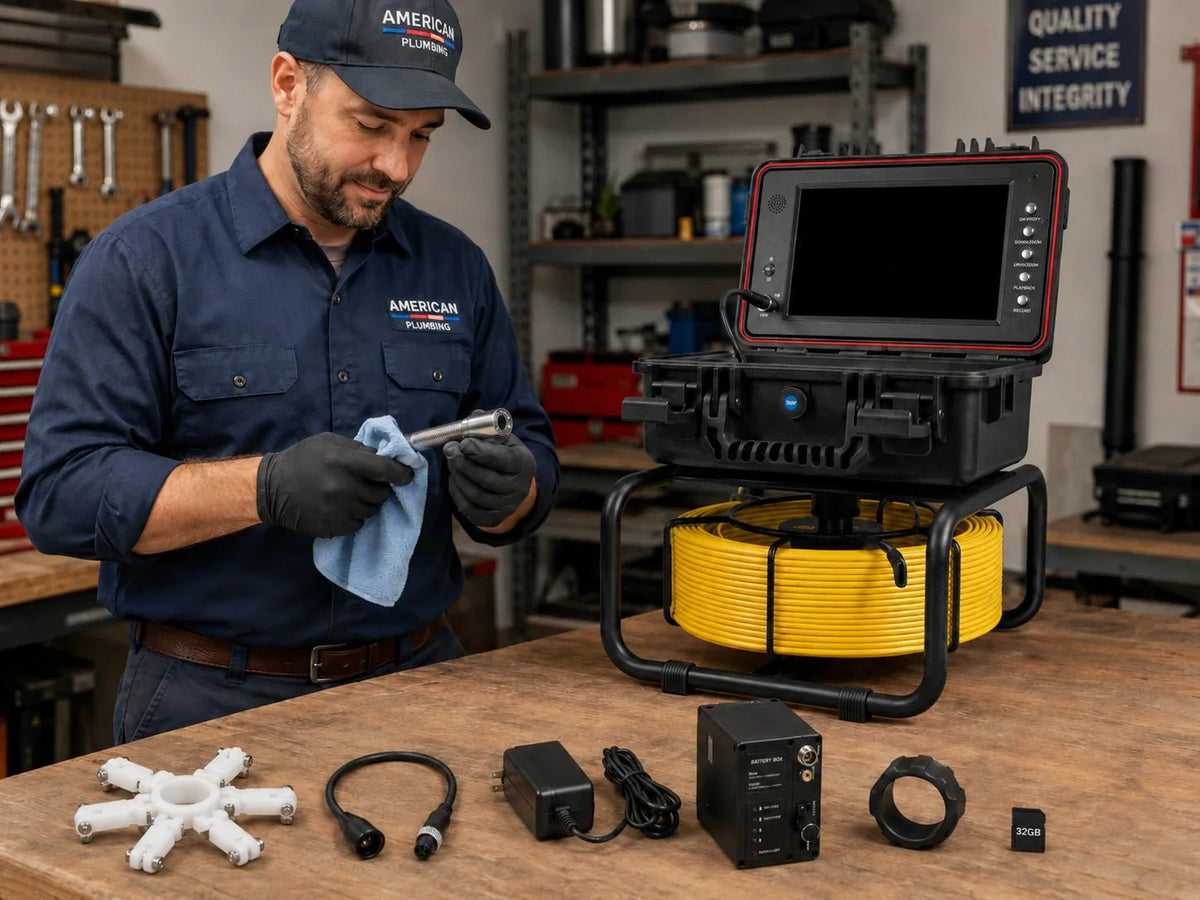
El mantenimiento de la cámara de alcantarillado es lo que separa una herramienta de inspección rentable de una futura reparación costosa. La página de soporte de RIDGID SeeSnake CS6x Versa dirige a los usuarios a un manual de operador y recursos de servicio dedicados porque las cámaras, los carretes, las baterías y los conectores necesitan cuidado más allá de la limpieza básica. El propio contenido de productos y soporte de Powerwill hace el mismo punto práctico en una vía de menor costo: los carretes con cabezales autonivelantes, varillas de empuje de fibra de vidrio, monitores DVR y baterías de litio duran más cuando se limpian, secan, cargan correctamente y se almacenan sin abuso de cables. Si desea mejores imágenes, menos fallas en el campo y menos tiempo de inactividad, la rutina de mantenimiento debe integrarse al final de cada trabajo.

Un buen mantenimiento comienza antes de que la cámara vuelva a su estuche. Límpiala correctamente, enrolla el cable correctamente y guárdala donde el próximo trabajo comience con una imagen clara.
Por qué el mantenimiento de la cámara de alcantarillado se amortiza solo
Una cámara de alcantarillado falla con mayor frecuencia por negligencia, no por accidentes dramáticos. Las cubiertas de lentes sucias, las varillas de empuje torcidas, las carcasas de monitores mojadas y las secciones de cable excesivamente dobladas convierten lentamente un buen sistema en una herramienta en la que nadie confía.
Los modelos L09D2 y 10DX1 de Powerwill integran componentes de alto valor en un solo carrete: cabezales autonivelantes, LED, varilla de fibra de vidrio, monitor DVR, baterías y electrónica de localización. Es precisamente por eso que la negligencia es costosa. No solo está desgastando un cable. Está degradando todo el flujo de trabajo de inspección.
El mantenimiento se amortiza solo porque protege el tiempo de actividad. Una lente limpia le proporciona pruebas utilizables. Un cable correctamente enrollado reduce los pliegues y la resistencia al empuje. Una unidad seca y cargada comienza el siguiente trabajo lista en lugar de comprometida.
Volver arribaLa forma correcta de limpiar la cámara después de cada trabajo
La mejor rutina de limpieza comienza incluso antes de que el carrete salga del lugar de trabajo. Limpie el lodo y el agua estancada de la varilla de empuje mientras la rebobina para que la contaminación no se arrastre dentro de la carcasa del carrete. Luego, limpie el cabezal de la cámara, el resorte y la cubierta de la lente con agua fresca y un paño suave en lugar de algo abrasivo.
Eso suena básico, pero resuelve tres problemas reales a la vez: imágenes más claras para el próximo trabajo, menos olor en el estuche y menos suciedad frotando contra la varilla y los sellos. Si deja que el agua residual se seque en el cable, convierte cada rebobinado posterior en un ciclo de desgaste sucio.
Preste especial atención a los LED y a la ventana de la lente. Una cámara puede encenderse técnicamente mientras produce imágenes inútiles simplemente porque una cubierta de lente sucia difunde la luz. La limpieza no es un cuidado estético. Es un cuidado de la calidad de imagen.
Cómo manejar el almacenamiento y el cuidado del cable sin acortar su vida útil
El cuidado del cable es donde comienzan muchos problemas costosos. Las varillas de las cámaras de alcantarillado están construidas para empujar, pero no para ser dobladas, aplastadas bajo otras herramientas o forzadas alrededor de curvas para las que el carrete y el cabezal nunca fueron diseñados.
Guarde el carrete en posición vertical o en la orientación de su estuche previsto, y enrolle la varilla de manera uniforme mientras se rebobina. Evite las curvas pronunciadas en el punto de salida del carrete y nunca deje el cable retorcido bajo tensión en el camión durante días. Si una sección se resiste a rebobinarse, deténgase y corríjala en lugar de forzarla.
Los sistemas de Powerwill listos para localizador y autonivelantes son lo suficientemente portátiles para el uso diario en camiones, pero la portabilidad no es lo mismo que la invencibilidad. Un buen almacenamiento significa condiciones secas, temperatura estable cuando sea posible y ningún equipo pesado apilado sobre el monitor, la caja de la batería o el marco del carrete.
También significa proteger el carrete de la contaminación entre trabajos. Una cámara almacenada junto a mangueras mojadas, botellas de productos químicos o herramientas de corte sueltas envejecerá más rápido incluso si ese día nunca entra en una tubería.
Volver arribaCuidado de la batería, el monitor y el conector que la mayoría de los equipos omiten
El rendimiento de la cámara depende tanto de la electrónica como de la varilla. Una batería que nunca está completamente cargada, un conector húmedo o un monitor que se deja al sol en el camión pueden terminar un trabajo antes de que la varilla siquiera entre en la limpieza.
El flujo de soporte oficial de RIDGID para el SeeSnake CS6x Versa existe por una razón: las baterías, los monitores y los accesorios necesitan soporte de firmware, cuidado del cargador y atención de servicio al igual que las piezas mecánicas. La misma mentalidad se aplica a los sistemas Powerwill con DVR incorporado y paquetes de baterías de litio. Cáerguelos en un ciclo sensato, mantenga los pines de los conectores secos y limpios, y no ignore pequeñas caídas de imagen o conexiones sueltas hasta que se conviertan en fallas en el lugar de trabajo.
Si su metraje parpadea, los LED se atenúan inesperadamente o la pantalla pierde la señal aleatoriamente, deje de culpar solo al entorno de la tubería. Muy a menudo, el problema de mantenimiento ya está en el compartimento de la batería o en la conexión de la cabeza al monitor.
Volver arribaUn programa de mantenimiento práctico para equipos ocupados
| Momento | Qué hacer | Por qué es importante |
|---|---|---|
| Después de cada trabajo | Limpiar la varilla durante el rebobinado, limpiar el cabezal y la lente, secar la carcasa, recargar si es necesario. | Evita la contaminación, protege la claridad de la imagen, mantiene la unidad lista. |
| Semanalmente | Inspeccionar la cubierta de la varilla, el resorte, los conectores, los LED, el marco de las ruedas y la carcasa del monitor. | Detecta el desgaste antes de que se convierta en un fallo en el campo. |
| Mensualmente | Revisar grabaciones, probar el comportamiento de carga, verificar el contador de distancia y la respuesta del localizador. | Confirma que todo el flujo de trabajo sigue funcionando como se espera. |
| Trimestralmente | Limpieza profunda, ajuste de hardware, reemplazo de accesorios gastados y registro de problemas recurrentes. | Reduce el tiempo de inactividad inesperado y apoya la planificación del reemplazo de piezas. |
Este horario es intencionalmente lo suficientemente simple como para sobrevivir el trabajo de campo real. Si la rutina es demasiado complicada, los equipos dejan de hacerla. Lo que importa es que la limpieza, el manejo del cable, la carga y la inspección se realicen con la frecuencia suficiente para que el daño prevenible nunca se convierta en algo normal.
Un registro de mantenimiento ayuda más de lo que muchas pequeñas empresas esperan. Cuando registra la resistencia recurrente del cable, la atenuación de los LED, la pérdida de duración de la batería o la holgura del conector, deja de adivinar si un problema es nuevo y comienza a planificar reparaciones antes de que el sistema falle en una llamada pagada.
Para los compradores que se preocupan por la reparabilidad, aquí es también donde las piezas reemplazables importan. Un sistema que puede aceptar nuevos accesorios, baterías o elementos de desgaste da un beneficio financiero al mantenimiento en lugar de hacer que cada pieza dañada se sienta como una decisión de pérdida total.
Volver arribaPuntos clave
- El mantenimiento de la cámara de alcantarillado protege la calidad de la imagen, la vida útil del cable y el tiempo de actividad en el lugar de trabajo, no solo la apariencia del equipo.
- El cabezal y la lente de la cámara necesitan una limpieza profunda después de cada uso porque la óptica sucia puede hacer que un sistema que funciona produzca imágenes inutilizables.
- La mayoría de los daños en los cables provienen de un mal enrollado, curvas pronunciadas, aplastamientos y el almacenamiento de tensión en la varilla, más que de un incidente dramático.
- El cuidado de la batería, el monitor y los conectores merece la misma atención que el carrete, ya que la negligencia electrónica puede arruinar un trabajo antes de que comience la inspección.
- Una rutina sencilla después del trabajo, semanal, mensual y trimestral hace que el mantenimiento profesional de la cámara de alcantarillado sea lo suficientemente realista como para que los equipos sigan haciéndolo.
Preguntas frecuentes
¿Con qué frecuencia debo limpiar una cámara de alcantarillado?
Después de cada trabajo. Limpie la varilla durante el rebobinado y limpie el cabezal de la cámara y la lente antes de que el carrete vuelva a guardarse.
¿Cuál es el error más grande que comete la gente con el cuidado del cable de la cámara de alcantarillado?
Fuerzan los pliegues y guardan secciones de cable retorcidas o aplastadas. Esa es una de las formas más rápidas de acortar la vida útil de la varilla de empuje y crear futuras fallas en el campo.
¿Debo guardar una cámara de alcantarillado mojada si necesito irme rápido del trabajo?
No, si puede evitarlo. Una limpieza y secado rápidos protegen la varilla, la carcasa y la calidad de imagen del próximo trabajo mucho más de lo que la gente cree.
¿Los problemas de batería y conectores realmente afectan la calidad del metraje?
Sí. Los LED tenues, las pantallas parpadeantes y las interrupciones de señal a menudo provienen de hábitos de carga descuidados o conexiones sucias y húmedas, no solo de condiciones difíciles de la tubería.
¿Qué sistemas Powerwill vale la pena mantener con un cronograma formal?
Cualquier carrete del que dependa regularmente, especialmente sistemas como el L09D2 y el 10DX1 con cabezales autonivelantes, monitores, baterías y electrónica de localización. Cuanto más integrada sea la herramienta, más importante es la disciplina de mantenimiento.
Conclusión
La mejor rutina de mantenimiento de la cámara de alcantarillado es la que se realiza cada vez que el carrete regresa de la línea. Límpielo, séquelo, enróllelo correctamente, cárguelo adecuadamente e inspecciónelo antes de que un pequeño desgaste se convierta en un costoso tiempo de inactividad.
Si está construyendo un flujo de trabajo de inspección repetible, comience con un sistema de cámara de alcantarillado Powerwill reparable y trate el mantenimiento como parte del trabajo, no como una tarea que pospone hasta que algo se rompa.
Volver arriba
Comments
No comments